Σάββατο 20 Δεκεμβρίου 2008
imobilecinema (Flash player plugin for Safari)
 1:45 μ.μ. | Αναρτήθηκε από
tsegman
1:45 μ.μ. | Αναρτήθηκε από
tsegman
iMobileCinema is a powerful Safari plugin for playing internet videos on your iPhone or iPod touch. You can watch millions of videos on any podcast site or blogs with it. Install it and visit Google Video, Youtube, or any other sites via Safari. Bunches of videos are waiting for you.
Watch the Demo:
WWW
Re: Imobilecinema (Flash player plugin for Safari)
« Reply #1 on: Yesterday at 11:07:13 pm »
iMobile Cinema
iMobileCinema is a powerful Safari plugin for playing internet videos on your iPhone or iPod touch. You can watch millions of videos on any podcast site or blogs with it. Install it and visit Google Video, Youtube, or any other sites via Safari. Bunches of videos are waiting for you.
Watch the Demo:
Install via Windows (PC)
For FW 1.1.4 to 2.2 --> Download Link(Ο πιο ευκολος τροπος)
Install via Cydia
v2.0 to v2.2 input this source: http://d.imobilecinema.com
Install via Installer
v1.1.4 input this source: http://d.imobilecinema.com
Install via PXL (iBrickr/Breezy)
1.1.1 to 1.1.2 -->Download Link
1.1.3 to 1.1.4 -->Download Link
2.0 to 2.2-->Download Link
Watch the Demo:
WWW
Re: Imobilecinema (Flash player plugin for Safari)
« Reply #1 on: Yesterday at 11:07:13 pm »
iMobile Cinema
iMobileCinema is a powerful Safari plugin for playing internet videos on your iPhone or iPod touch. You can watch millions of videos on any podcast site or blogs with it. Install it and visit Google Video, Youtube, or any other sites via Safari. Bunches of videos are waiting for you.
Watch the Demo:
Install via Windows (PC)
For FW 1.1.4 to 2.2 --> Download Link(Ο πιο ευκολος τροπος)
Install via Cydia
v2.0 to v2.2 input this source: http://d.imobilecinema.com
Install via Installer
v1.1.4 input this source: http://d.imobilecinema.com
Install via PXL (iBrickr/Breezy)
1.1.1 to 1.1.2 -->Download Link
1.1.3 to 1.1.4 -->Download Link
2.0 to 2.2-->Download Link

Παρασκευή 19 Δεκεμβρίου 2008
iPhone 101: Reboot your iPhone for better gaming

One of the biggest comments on the recent SimCity announcement for the iPhone, other than being able to locate the SimCity International (link goes to the U.K. iTunes store) version of the game, was complaints that the game was crashing for some people.
This is not a new issue for graphically intense games for the iPhone and one of the solutions for solving this is very easy: Before playing your new game, reboot the iPhone.
Here's how to do it.
Update: As has been pointed out in the comments, a normal shutdown/startup process, or "soft reboot," should work fine: simply hold the power button down for 3 seconds and slide to power down. The "hard reboot" described here should only be used if your iPhone isn't responding to touches or the Home button -- it is not intended as regular maintenance. Thanks to all for the feedback.
[If your phone ever becomes completely unresponsive, you may need to do the 'hard reboot process described next -- but remember this is the equivalent of pulling out the power cord on your computer.] Hold down the Home and the Sleep/Wake buttons until your screen goes black, as shown at right. After a few seconds, you should see a sliding bar for powering off the phone. Ignore it and keep pressing those buttons. After about 20 seconds or so, the screen will go completely black and the silver Apple logo appears.
Once your phone goes through the rebooting process, launch your game. You shouldn't have any further problems with it. One word of warning: Rebooting the iPhone does drain your battery somewhat, so if you're pretty low on power you may find yourself unable to use the phone until after you're recharged it.
Why reboot your phone? The iPhone, like a regular computer, uses memory and system resources every time you launch a program. The typical iPhone user utilizes several applications at a time, often hopping back and forth between them. When a program that is heavy on system resources is launched, such as SimCity, if you haven't rebooted in awhile to refresh your iPhone's memory and resources, it could cause the program to crash.
I saw this tip posted on the App Store when I was purchasing Scrabble at the end of November and followed the advice and didn't have a single problem with Scrabble on my 1st generation iPhone. I repeated it with SimCity and, again, I'm not having any issues playing the game.
If that doesn't solve your issues, check out this list of iPhone troubleshooting tips.
Πέμπτη 18 Δεκεμβρίου 2008
Metal Gear Solid Touch Revealed for iPhone

Solid Snake's next adventure will sidestep the "Xbox 360 versus PlayStation 3" debate by appearing on neither platform; instead, Konami's anthropomorphized Cold War allegory will be sneaking his way onto Apple's iPhone.
Metal Gear Solid Touch is scheduled for release in Spring 2009, reports Kotaku. The game is a completely original adventure set in the latter-day world of Metal Gear Solid 4 (read: Snake is a geriatric), and consists of 8 stages.
What would a Metal Gear Solid game be without unlockable content? Earning bonus points through gameplay will allow players to download special Metal Gear-themed iPhone wallpapers.
No price has been established for the title, though we expect to hear more details from Konami soon.
Image: Konami
Κυριακή 26 Οκτωβρίου 2008
iStorage: iPhone file manager
Το iStorage είναι μία εφαρμογή διαχείρησης αρχείων μέσω της οποίας μπορείτε να συνδεθείτε εύκολα με το iPhone σας σε FTP, Web-DAV ή MobileMe iDisk και να κατεβάστε αρχεία ενώ παράλληλα να εργάζεστε σε διάφορους λογαριασμούς ταυτόχρονα.

Το iStorage είναι συμβατό τόσο με Mac όσο και με PC και προσφέρει πολλές λειτουργίες όπως:
- Ανέβασμα, προβολή και διαχείρηση των αρχείων στο iPhone ή iPod touch
- Κατέβασμα φακέλων/αρχείων στην συσκευή σας από το δίκτυο
- Διαμοίραση αρχείων με Web-DAV server, κατέβασμα και διαχείριση των αρχείων από υπολογιστή
- Ενσωματωμένος web browser
- Αποθήκευση τοποθεσίας φακέλου/αρχείου και σελίδων σε bookmarks για γρήγορη πρόσβαση
- Υποστήριξη ενσωματωμένης κάμερας και διαχειριστή φωτογραφιών
Υποστηριζόμενα αρχεία:
.jpg, .tiff, .gif (εικόνες)
.doc a .docx (Microsoft Word)
.htm a .html (web sites)
.key (Keynote); .numbers (Numbers); .pages (Pages)
.pdf (Adobe Acrobat)
.ppt & .pptx (Microsoft PowerPoint)
.txt (text)
.xls & .xlsx (Microsoft Excel)
Το iStorage είναι διαθέσιμο μέσω του App store στην τιμή των 4.99€
[Thanks to Somnius]
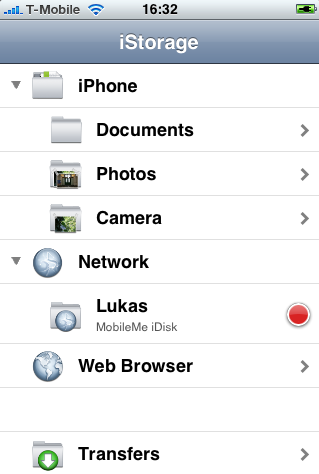
Το iStorage είναι συμβατό τόσο με Mac όσο και με PC και προσφέρει πολλές λειτουργίες όπως:
- Ανέβασμα, προβολή και διαχείρηση των αρχείων στο iPhone ή iPod touch
- Κατέβασμα φακέλων/αρχείων στην συσκευή σας από το δίκτυο
- Διαμοίραση αρχείων με Web-DAV server, κατέβασμα και διαχείριση των αρχείων από υπολογιστή
- Ενσωματωμένος web browser
- Αποθήκευση τοποθεσίας φακέλου/αρχείου και σελίδων σε bookmarks για γρήγορη πρόσβαση
- Υποστήριξη ενσωματωμένης κάμερας και διαχειριστή φωτογραφιών
Υποστηριζόμενα αρχεία:
.jpg, .tiff, .gif (εικόνες)
.doc a .docx (Microsoft Word)
.htm a .html (web sites)
.key (Keynote); .numbers (Numbers); .pages (Pages)
.pdf (Adobe Acrobat)
.ppt & .pptx (Microsoft PowerPoint)
.txt (text)
.xls & .xlsx (Microsoft Excel)
Το iStorage είναι διαθέσιμο μέσω του App store στην τιμή των 4.99€
[Thanks to Somnius]
Σάββατο 25 Οκτωβρίου 2008
Apple seeds iPhone Firmware 2.2 Beta 2 - and then unseeds it!
H Apple άρχισε να εκδίδει την iPhone Firmware v2.2 Beta 2 σε μια μικρή ομάδα προγραμματιστών:

Update: Apple has removed the update, leaving developers with access to only the “old” iPhone Firmware v2.2 Beta 1.
[Via appleiphoneapps]

Update: Apple has removed the update, leaving developers with access to only the “old” iPhone Firmware v2.2 Beta 1.
[Via appleiphoneapps]
Πέμπτη 23 Οκτωβρίου 2008
PhoneView: iPhone as a hard drive
Το PhoneView είναι μία εφαρμογή (μόνο για Mac) μέσω της οποίας μπορείτε να δείτε αλλά και να διαχειριστείτε το iPhone σας, σαν να είναι ο σκληρός σας δίσκος!

Με το PhoneView αποκτάτε πρόσβαση εύκολα και απλά σε όλο το διαθέσιμο υλικό σας:
- Χρησιμοποιήστε το iPhone σαν σκληρό δίσκο
- Πρόσβαση στα τραγούδια και στα βίντεο
- Δείτε και εξάγετε τα SMS
- Κατεβάστε τις εικόνες της κάμερας
- Δημιουργήστε, επεξεργαστείτε σημειώσεις
- Δείτε και εξάγετε ιστορικό κλήσεων
- Διαχειριστείτε τις επαφές σας
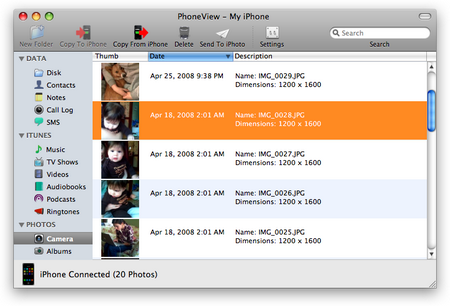
Με το PhoneView αποκτάτε πρόσβαση εύκολα και απλά σε όλο το διαθέσιμο υλικό σας:
- Χρησιμοποιήστε το iPhone σαν σκληρό δίσκο
- Πρόσβαση στα τραγούδια και στα βίντεο
- Δείτε και εξάγετε τα SMS
- Κατεβάστε τις εικόνες της κάμερας
- Δημιουργήστε, επεξεργαστείτε σημειώσεις
- Δείτε και εξάγετε ιστορικό κλήσεων
- Διαχειριστείτε τις επαφές σας
mBoxMail: Hotmail on your iPhone
Η default Mail.app εφαρμογή του iPhone έχει το μειονέκτημα ότι δεν υποστηρίζει Windows Live Hotmail. Το mBoxMail, όμως, έρχεται από την mFluent να αλλάξει τα δεδομένα προσφέροντας μια εφαρμογή η οποία μπορεί να υποστηρίξει Hotmail account στο iPhone!

Επιτέλους, μπορείτε να έχετε τα μηνύματα και τους φακέλους του Hotmail Account σας στην οθόνη του iPhone ανά πάσα στιγμή. Η εφαρμογή ΔΕΝ απαιτεί jailbreak και προσφέρει πλήρη λειτουργικότητα της υπηρεσίας Hotmail μέσα από το άνετο λειτουργικό του iPhone:
Το mBoxMail διατίθεται από το AppStοre στην τιμή των 7.99€
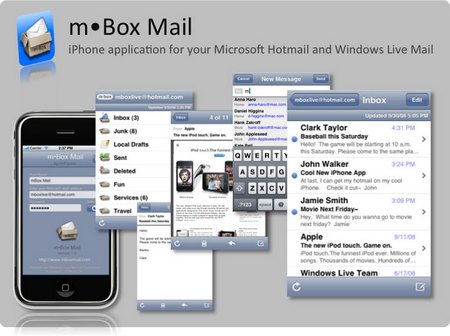
Επιτέλους, μπορείτε να έχετε τα μηνύματα και τους φακέλους του Hotmail Account σας στην οθόνη του iPhone ανά πάσα στιγμή. Η εφαρμογή ΔΕΝ απαιτεί jailbreak και προσφέρει πλήρη λειτουργικότητα της υπηρεσίας Hotmail μέσα από το άνετο λειτουργικό του iPhone:
Το mBoxMail διατίθεται από το AppStοre στην τιμή των 7.99€
Εγγραφή σε:
Αναρτήσεις (Atom)